
Self-Hosted Linux Desktops.
Zero Database. Zero Trust.
A lightweight, self-hosted web GUI & lifecycle manager for LinuxServer.io Docker Webtop containers. Features strict 127.0.0.1 localhost binding, real-time SSE telemetry, in-browser WebSocket terminal, and two-tier storage.
docker run -d -p 127.0.0.1:8080:8080 -v /var/run/docker.sock:/var/run/docker.sock ghcr.io/mngdlnx/webtop-manage:latest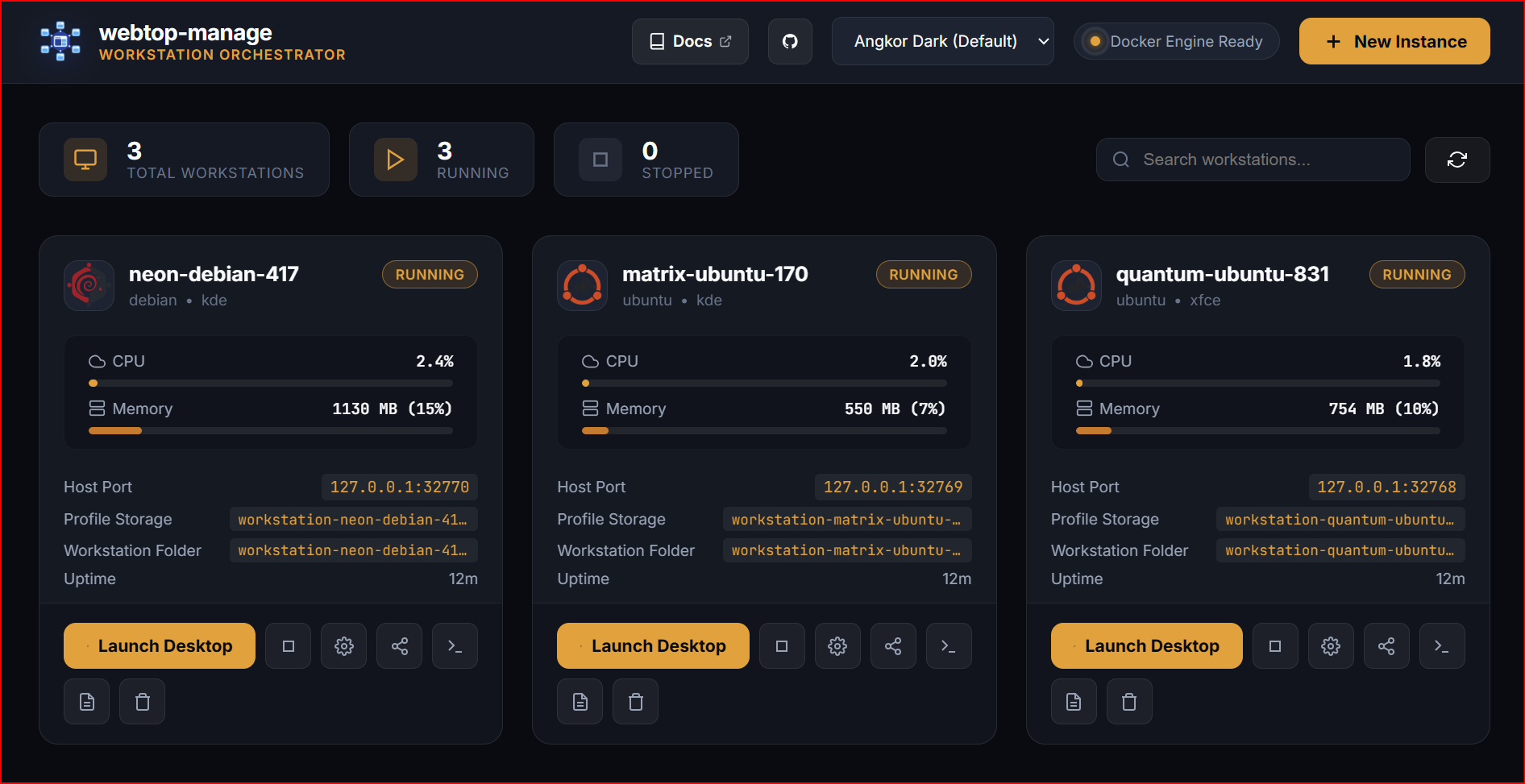
A Clean, Powerful Dashboard for Every Container
Monitor resource usage in real time, launch web desktop sessions, and manage container lifecycles from a single high-performance web console.
Real-Time Telemetry & Gauges
Live CPU % usage and memory consumption (MB & %) streamed via low-latency Server-Sent Events with zero database polling overhead.
Strict 127.0.0.1 Loopback Ports
Every container is bound exclusively to local 127.0.0.1 host ports (e.g. 127.0.0.1:32768+), preventing unauthorized access across local networks.
1-Click In-Browser Desktop Launch
Launch directly into your isolated Ubuntu or Debian XFCE / KDE desktop environment in a new browser tab with full sound, clipboard, and file transfer.
Two-Tier Storage & Volume Guard
Decoupled persistent volume storage separates browser profile settings from project workspace repositories to prevent accidental data loss.
Engineered for Performance & Total Isolation
Everything you need to orchestrate containerized Linux desktop environments with zero overhead and rock-solid defense-in-depth defaults.
Dual-Track Provisioning Wizard
Quick Launch curated templates or Custom Blueprint with distro matrix, custom image validation, port conflict scanning, and hardware GPU toggles.
Zero-Trust Localhost Binding
Strict 127.0.0.1 loopback isolation ensures zero accidental LAN or WAN exposure on daemon (8080) and workstation ports (3000+).
Real-Time SSE Telemetry
Low-overhead Server-Sent Events stream live CPU % and RAM MB metrics without polling. Update CPU and RAM limits on the fly with zero downtime.
In-Browser Interactive Terminal
Full-featured WebSocket PTY root shell powered by xterm.js with dynamic window resizing and CSWSH origin security validation.
Visual Host Directory Browser
Interactive host filesystem explorer modal with drive shortcuts and security containment preventing access to sensitive system paths.
100% Stateless Zero-DB Engine
Docker container labels serve as the atomic single source of truth. No SQLite or PostgreSQL needed. Zero migrations, zero corruption risk.
Tailored for Every Workflow & Distro
Compare pre-tuned configurations with calibrated Shared Memory (/dev/shm) and hardware acceleration.

Ubuntu Workstation (XFCE)
Popular • Fast • Lowest Memory (~250MB Idle)
General software development, Python/Node.js scripting, lightweight browsing, minimal host overhead
{
  "name": "sonic-ubuntu-850",
  "preset": "ubuntu-xfce",
  "image": "lscr.io/linuxserver/webtop:ubuntu-xfce",
  "host_ip": "127.0.0.1",
  "host_port": 3000,
  "internal_port": 3000,
  "custom_user": "abc",
  "shm_size_mb": 1024,
  "auto_start": true
}workstation-<name>-config & workstation-<name>-data API docs ↗ Security & Network Isolation Architecture
Designed from the ground up for strict local-first security. Click nodes in the diagram to inspect security guarantees.
Strict Loopback Host Interface
127.0.0.1:8080 & 127.0.0.1:3000-3050webtop-manage Go Daemon (Clean Arch)
Domain Models · Ports · Docker Socket AdapterDedicated subnet per instance or airgapped isolated sandbox.
Separate /config from /workspace.
Strict 127.0.0.1 Loopback Isolation
Every workstation published port (e.g. 3000, 3001) and the management daemon port (8080) explicitly bind to 127.0.0.1 rather than 0.0.0.0.
- Cannot be scanned by unauthorized devices on local WiFi or LAN.
- Protects against accidental open firewall ports on VPS deployments.
- Pair with Caddy, Nginx, or Cloudflare Tunnel for authenticated remote access.
Launch in Seconds with Docker Compose
Deploy the management engine with zero database dependencies. The single lightweight Go binary handles container provisioning, SSE telemetry, and WebSockets.
Strict 127.0.0.1 Binding: Guarantees zero unintended LAN or public exposure.
Isolated Bridge Network: Creates dedicated sandbox bridges (`workstation-<name>-net`) with Kernel Air-Gap support.
Visual Host Directory Browser: Read-only `/:/host:ro` mount enables secure interactive folder selection.
services:
  webtop-manage:
    # Use official pre-built multi-arch image (or build: . from source)
    image: ghcr.io/mngdlnx/webtop-manage:latest
    container_name: webtop-manage
    restart: unless-stopped
    ports:
      # Strict 127.0.0.1 loopback binding for security
      - "127.0.0.1:8080:8080"
    volumes:
      # Docker daemon socket passthrough to manage sibling containers
      - /var/run/docker.sock:/var/run/docker.sock
      # Host root filesystem mount (read-only) for visual folder browsing
      - /:/host:ro
      # Optional: Custom Presets, Themes & Config files
      # - ./presets.json:/app/presets.json:ro
      # - ./themes.json:/app/themes.json:ro
      # - ./config.json:/app/config.json:ro
    environment:
      - PORT=8080
      - BIND_HOST=0.0.0.0
      - APP_TITLE=webtop-manage
      - DEFAULT_INSTANCE_BIND_IP=127.0.0.1
      - DEFAULT_NETWORK=webtop-net
      - DEFAULT_TZ=Etc/UTC
      - DEFAULT_KEYBOARD=en-us-qwerty
      - DEFAULT_SHM_SIZE_MB=1024
      - BASE_PORT=3000
      - DEFAULT_EGRESS_POLICY=full
    networks:
      - webtop-net

networks:
  webtop-net:
    name: webtop-net
    driver: bridge
Ready to supercharge your Linux workstation workflows?
Explore complete developer guides, protocol specifications, SSE telemetry math, and REST API documentation.